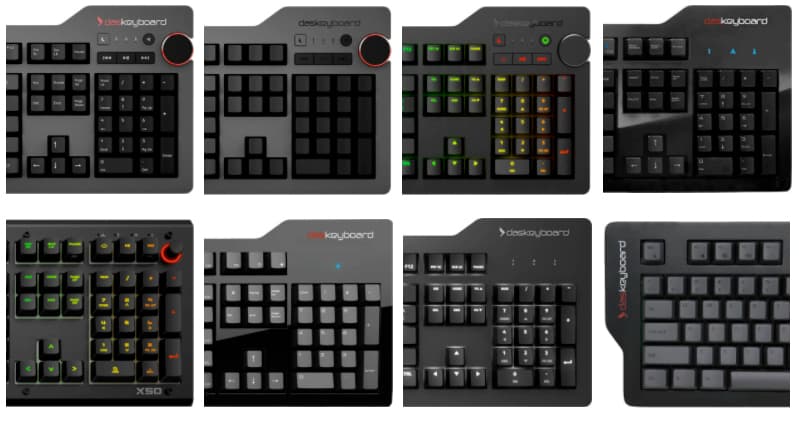
There is no single best mechanical keyboard. There is a best one for how you work, and the decision usually comes down to three things: the layout you need, the switch you can live with, and whether anyone else has to hear it.
This is a shortlist by use case. Each section links to a fuller guide if you want the comparison table and the specifics.
Learning to type
Pick: Das Keyboard Model S Professional, Cherry MX Brown — $149
If you are still learning the layout, buy a plain board with printed legends and a tactile switch, and spend the money you saved on practice. RGB, programmable lighting and compact layouts are all things you can want later, once you know what you actually like.
Choose Brown over Blue here. Both are tactile; Blue adds an audible click that is a lot of noise to commit to before you know whether you enjoy it. And do not start on blank keycaps — removing the legends only helps someone who already touch-types, and it will slow you down while you are still learning where the keys are.
Programmers and developers
Picks: Das Keyboard 4 Professional — $199, or DeltaForce 65 — $169
Two things matter more than anything else on a developer's desk. Full NKRO, so chord-heavy editors report every key you are holding rather than dropping a modifier. And a layout that keeps the editing cluster where your IDE expects it.
The 4 Professional is the safe default: full-size, Cherry MX, dedicated media keys, and a powered two-port USB hub for a YubiKey or a wired mouse. The DeltaForce 65 is the one to look at if you want the mapping to live on the keyboard rather than on the machine — it runs open-source QMK, so you can define layers and macros and flash your own build, or stay in VIA and remap from a GUI.
The 4Q adds per-key RGB driven by a documented REST API on localhost. An HTTP POST sets a key's colour, so a CI hook can turn a key red on a failed build. It is a real API rather than a closed SDK, which is the part developers tend to care about.
Full guide: mechanical keyboards for programmers →
Gaming
Picks: DeltaForce 65 — $169, or Das Keyboard X50Q
The main argument for a compact board in an FPS is mouse arc: dropping the number pad gives your mouse hand room to swing at low DPI. The DeltaForce 65 takes that further than a tenkeyless, keeping the arrows and navigation cluster in roughly 60% of a full-size footprint, and its binds live in firmware so they travel with the board.
If you want the number pad and per-key RGB you can drive from your own code, the X50Q is the full-size option. The 4C TKL is the middle ground — Cherry MX, no numpad, no lighting.
Worth being straight about one thing: no switch here is measurably faster than another. Linear switches have no tactile bump, which is why they are the common choice for fast repeated taps, but the difference is feel rather than speed.
Writers
Picks: Das Keyboard 4 Ultimate (blank) or 4 Professional (printed) — $199
Editing a long manuscript is thousands of trips between paragraphs, so the argument for a full-size board here is the editing cluster: real arrows, real Home and End, real Delete, each one keystroke rather than three.
The blank 4 Ultimate is the one writers ask about. It is a constraint rather than a feature — there is nothing to glance down at, which helps if you already touch-type and frustrates you if you do not. The 4 Professional is the identical keyboard with legends printed on.
On switches: Brown if anyone else can hear your desk, Blue if you want the noise and work alone. If you learned on a typewriter you will probably prefer Blue.
New York Times bestselling author George Beahm writes on a Das Keyboard — we interviewed him in a customer spotlight. The New York Times has also covered why the keyboard matters to people who write for a living.
Full guide: mechanical keyboards for writers →
Accounting and finance
Pick: Model S Professional — $149, or the 4 Professional — $199
One firm rule: full-size. If the day involves entering numbers, the number pad is not optional, and a tenkeyless or 65% board will make the job worse no matter how good it feels.
Beyond that the choice is small. The Model S is the plain option. The 4 Professional adds dedicated media keys, a volume knob and a powered USB hub, which matters if you work with headphones on.
Designers
Pick: Das Keyboard Prime 13 — $159
The Prime 13 is a full-size board with a white LED backlight and an aluminium top, and no RGB or software layer. Creative Bloq picked it out for its minimalist design and build quality in their keyboard roundup.
If you would rather have per-key RGB — to light the modifier keys a particular application leans on, for instance — the 4Q covers that through Q Software.
Students
Picks: DeltaForce 65 — $169, or 4C TKL — $149
Dorm desks are small and shared desks are smaller, so this is mostly a footprint decision. The 4C TKL drops the number pad and keeps everything else. The DeltaForce 65 goes further — 68 keys, arrows and navigation cluster intact, function row on a layer — and its detachable USB-C cable makes it the easier one to put in a bag.
Students, faculty and institutions in the US can claim education pricing on any of them.
The short version
| If you are a… | Start with | Layout | Why | Price |
|---|---|---|---|---|
| Beginner | Model S Professional | Full-size | Plain, printed legends, tactile | $149 |
| Programmer | 4 Professional / DeltaForce 65 | Full-size / 65% | Full NKRO; QMK on the 65% | $199 / $169 |
| Gamer | DeltaForce 65 / X50Q | 65% / Full-size | Mouse room, or RGB over an API | $169 / — |
| Writer | 4 Ultimate / 4 Professional | Full-size | Editing cluster; blank or printed | $199 |
| Accountant | Model S Professional | Full-size | Number pad is non-negotiable | $149 |
| Designer | Prime 13 | Full-size | Backlit, aluminium, no software | $159 |
| Student | DeltaForce 65 / 4C TKL | 65% / TKL | Smallest footprint; education pricing | $169 / $149 |
Switch feel is the part you cannot read off a spec sheet, so if you are buying for someone else and guessing, remember that direct orders carry a 30-day money-back guarantee. Browse all Das Keyboard mechanical keyboards, or compare the switches in the mechanical keyboard guide.